
Close Menu
    Latest Category
    • Finance
    • Tech
    • EU Law
    • Energy
    • About
    • Contact
    EUbusiness.com | EU news, business and politicsEUbusiness.com | EU news, business and politics
    Login
    • EU News
    • Focus
    • Guides
    • Press
    • Jobs
    • Events
    • Directory
    EUbusiness.com | EU news, business and politicsEUbusiness.com | EU news, business and politics
    Home » How to download the Parimatch application

    How to download the Parimatch application

    npsnps9 May 2022Updated:26 June 2024
    — Filed under: Focus
    Share
    Facebook Twitter LinkedIn Pinterest Email

    Betting company Parimatch has been considered one of the most popular in the post-Soviet countries for many years. One of the main reasons for this success lies in the fact that the bookmaker constantly cares about the comfort of its customers and tries to satisfy all their requests as much as possible.
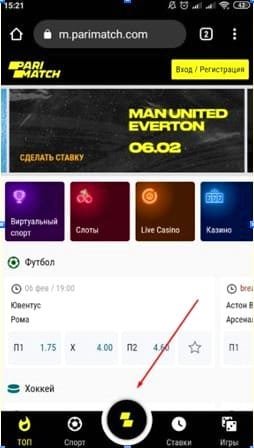
    Parimatch application

    One example of such care is a convenient mobile application developed by the company. Its use allows you to minimize the requirements for the quality of the Internet connection, and also permanently removes the problem of potential access restrictions due to blocking.

    A detailed review of the applications of the betting company Parimatch can be found in the relevant section of the site uz-bet.club. In this article, we will talk about how to download and install the application, depending on the operating system of the gadget.

    Installing the app on iOS

    Owners of devices with the iOS operating system do not experience the slightest problem with installing the Parimatch application. You can download it in one of two ways:

    1. Visit the bookmaker’s website from your smartphone and select the “App for iOS / Android” item in the menu. After that, you will be automatically redirected to the application page in the App Store. Further loading occurs in the traditional way.
    2. Find the Parimatch app through the search field in the market. It should be taken into account here that there are separate programs for players from Kazakhstan and Russia (where the bookmaker operates under local licenses). They will not suit the residents of Uzbekistan. Therefore, download the app developed by Pari-Match N.V.

    It is worth noting that the Parimatch app ranks first in the Sports category. It is compatible with operating system version from iOS 12.0.

    Installing the application on Android

    Unlike the App Store, the Play Market does not provide the ability to download Parimatch apk directly. Goggle does not cooperate with bookmakers and instantly removes any programs related to this area from its services. Therefore, you have to download the application manually. To do this, you should adhere to the following algorithm:

    1. Visit the bookmaker’s website and select the “App for iOS / Android” item in the menu. If this is done from the phone, the download of the apk file will immediately begin. If from a computer, a QR code appears in front of the user, having scanned it, he will again start the download process.
    2. Confirm the download of the installation package.
    3. Wait for the download to finish and run the file to start the installation.
    4. Wait for the installation to finish.
    5. Delete the installation package.

    If at the time the download starts, the gadget will give an error, you must give permission to install programs obtained from third-party sources. You can do this in the “Security” or “Administration” section of the phone settings.

    The Parimatch app for Android does not update automatically. When a new version is available, the user will be notified accordingly.


    Add A Comment
    Leave A Reply Cancel Reply

    You must be logged in to post a comment.

    nps
    • Website

    Related Content

    Renewable energy - Image by Maria Maltseva from Pixabay

    47 pct of EU’s electricity came from renewables in 2025

    Lawyer - Photo by Pavel Danilyuk on Pexels

    What You Need To Know About Inheriting a Business in the UK

    Mortgage advice - Photo by RDNE Stock project on Pexels

    Mortgage Rates Rise As Bridging Rates Fall

    Business proposals - Image by Ronald Carreño from Pixabay

    SMEunited sees step toward reduced fragmentation with “EU Inc.”

    Sponsor: SMEunited18 March 2026
    Henna Virkkunen - Photo © European Union 2026

    EU Inc. to boost startups and growth in Europe

    EUnited logo

    Environment & Sustainability Officer, European Engineering Industries Association, EUnited

    LATEST EU NEWS
    Renewable energy - Image by Maria Maltseva from Pixabay

    47 pct of EU’s electricity came from renewables in 2025

    19 March 2026
    Henna Virkkunen - Photo © European Union 2026

    EU Inc. to boost startups and growth in Europe

    18 March 2026
    Bioeconomy - farmer ploughing field - Photo by Frank Molter © European Union 2017

    EU adopts strategy for sustainable bioeconomy

    17 March 2026
    Cargo Ship on Rhine River - Photo by Wolfgang Vrede on Pexels

    New state aid rules to boost sustainable transport in EU

    16 March 2026
    Fit pensioner - Photo by Centre for Ageing Better on Pexels

    EU life expectancy increases again to 81.5 years

    13 March 2026

    Subscribe to EUbusiness Week

    Get the latest EU news

    CONTACT INFO

    • EUbusiness, 117 High Street, Chesham Buckinghamshire, HP5 1DE, United Kingdom
    • +44(0)20 8058 8232
    • service@eubusiness.com

    INFORMATION

    • About Us
    • Advertising
    • Contact Info

    Services

    • Cookie Policy
    • Terms
    • Disclaimer

    SOCIAL MEDIA

    Facebook
    eubusiness.com © EUbusiness Ltd 2026

    Type above and press Enter to search. Press Esc to cancel.

    Manage Consent
    To provide the best experiences, we use technologies like cookies to store and/or access device information. Consenting to these technologies will allow us to process data such as browsing behavior or unique IDs on this site. Not consenting or withdrawing consent, may adversely affect certain features and functions.
    Functional Always active
    The technical storage or access is strictly necessary for the legitimate purpose of enabling the use of a specific service explicitly requested by the subscriber or user, or for the sole purpose of carrying out the transmission of a communication over an electronic communications network.
    Preferences
    The technical storage or access is necessary for the legitimate purpose of storing preferences that are not requested by the subscriber or user.
    Statistics
    The technical storage or access that is used exclusively for statistical purposes. The technical storage or access that is used exclusively for anonymous statistical purposes. Without a subpoena, voluntary compliance on the part of your Internet Service Provider, or additional records from a third party, information stored or retrieved for this purpose alone cannot usually be used to identify you.
    Marketing
    The technical storage or access is required to create user profiles to send advertising, or to track the user on a website or across several websites for similar marketing purposes.
    • Manage options
    • Manage services
    • Manage {vendor_count} vendors
    • Read more about these purposes
    View preferences
    • {title}
    • {title}
    • {title}

    Sign In or Register

    Welcome Back!

    Login to your account below.

    Lost password?